Thank you for your question. To be honest, I still don’t understand the technical context of your description.
You are using
a Stratux including ADS-B and FLARM reception.
→ paired via Wi-Fi with your phone/tablet?
the SafeSky app on your tablet/phone, which also runs your VFRnav?
And, as you say, the Stratux data goes from SafeSky to VFRnav?
I still don’t quite see how that works. Please describe it in more detail.
You activate pure Mode S signals (without position data) in Stratux as bearingless targets.
Those are the circles marked Mode S that then appear in VFRnav. In areas with heavy air traffic, the information circles overlap significantly. You want the registration markings to be displayed here, right?
First: Yes, my Stratux (ADS-B and Flarm) is connected directly via WLAN to my phone. Bearingless Targets are enabled. Everything is fine and no issues so far. On the same phone that also runs VFRnav, SafeSky is installed. Since I’d like to have both data sets in VFRnav, I had my Stratux connect to SafeSky (works well) and SafeSky in turn forwards all its data (those from the Stratux (prefix “ea”)) and its own (prefix “sy”) to VFRnav.
Until now, bearingless Targets in VFRnav were only displayed as a circle indicating the altitude difference. Since one of the recent updates, it also displayed the registration in addition to the circle and the altitude difference. I think that’s great, because it helps, for example, to assign the “circle” a bit better through circuit radio communications.
Since the last update, however, my bearingless Targets in VFRnav no longer show the registration, but only the words “MODE S”—kind of like a placeholder, etc.
Is this a bug or what is the problem, since until recently it still worked?
Thank you very much for your detailed presentation
I wasn’t aware of any interplay between SafeSky and Stratux until now.
I’ve just fired up my test Stratux environment.
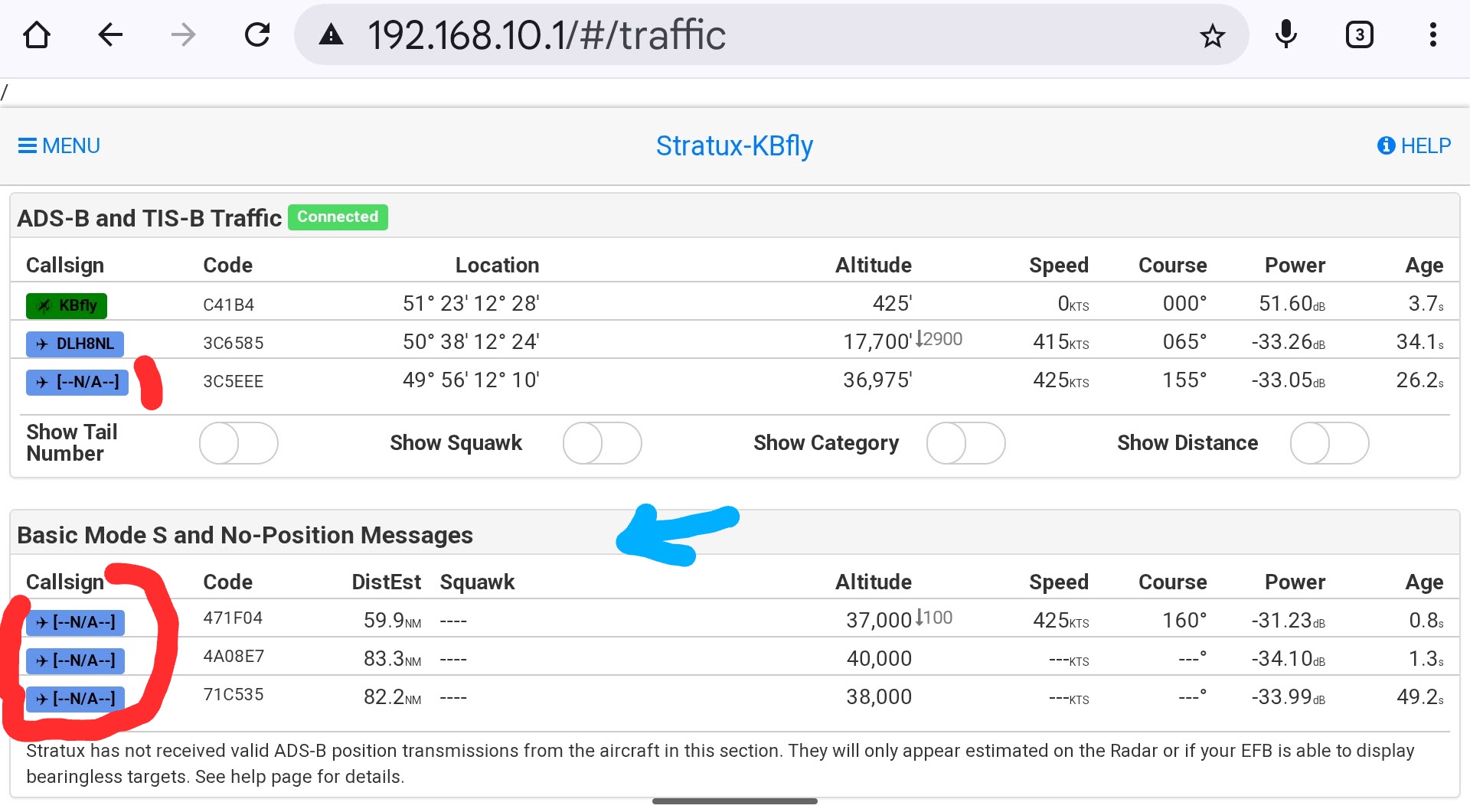
The image shows a snippet of the Stratux Web Interface.
As you can see in the image, some signals are already not being received with the aircraft registration. Of course, these cannot be displayed differently in VFRnav (i.e. as a received Mode S signal). Regarding SafeSky specifically, I’m afraid I can’t say anything. However, since version 4.18.x fundamental programmatic groundwork has been laid for the future, and whether there’s any connection, Hermann will certainly have something to say about your question.
So let’s wait and see what the master says
So, today I was able to fly and try everything out again. So, when I connect the Stratux directly to VFRnav via TCP, everything is displayed correctly.
That is, with registration and altitude.
If I take the data from the Stratux via UDP, instead of the registration only “MODE S” appears. This can also be seen under “Settings - Traffic Data”. There, instead of the registration only “MODE S” is shown.
Therefore, it seems that SafeSky is forwarding the data that originally comes from the Stratux to VFRnav incorrectly or differently.
I was able to carry out further tests today. When I set “External Data Source” to TCP (port 2000) in the settings, Stratux correctly displays the bearingless targets, including their registration numbers.
When I switch to UDP, the ADS-B data are displayed correctly, but the bearingless targets appear without registration numbers. Instead, “MODE S” is shown.
Are different data transmitted with TCP and UDP?
Can VFRnav receive multiple protocols simultaneously? I want to receive Stratux and SafeSky at the same time so that they can complement each other (or in case the mobile data connection for SafeSky is lost).
In the settings I can only choose either TCP (good for my Stratux) or UDP (good for SafeSky). In EnrouteFlightNav, I believe all protocols are received and processed simultaneously.
Honestly? Ditch SafeSky from your config. The guys know marketing, but it’s just a scam.
You’ve got a Stratux, what more could you want? Make sure you’re receiving FLARM/OGN in addition to ADS-B. That gives you everything, and it doesn’t get any more up to date. If the Stratux isn’t there or fails, then CCAS. It does the same as SafeSky and it’s free.
Unfortunately, there are still very, very many aircraft flying around with only a Mode S transponder. Without FLARM and without ADS-B.
These aircraft are not seen by OGN, FLARM or CCAS. My Stratux of course only displays these targets as a range ring. So you don’t know whether the aircraft is in front of you or behind you or to the left or right.
SafeSky, however, can display these aircraft. Similar to Flightradar. They apparently do something akin to a cross-bearing and show you where the aircraft is and in which direction it’s flying.
And I don’t want to lose this advantage if at all possible, and I think the existing integration in VFRnav is great!
Otherwise, you’d be absolutely right.
Best regards,
Gunnar.
By the way: Anyone who uses SafeSky in flight has their position fed via SafeSky into the OGN-Network, without needing to buy an expensive FLARM. (Keyword: visibility, passive safety)
I have to confess, I too don’t really understand your active system using SafeSky and Stratux in parallel. Since I develop on Stratux myself, I’m happy to comment on the topic. The self-made version works great by default and with 0.32 is considered stable in its basic functions. Even with a standard antenna set you receive signals on 1090 MHz radar and 868 MHz – various protocols (yes, Flarm compatible). If you also have a T-Beam on the Stratux, you will be seen on 868 MHz in many systems. Then you basically already have the “wish-fulfilment package”.
You!!! thus receive for yourself what you see, independent of the unreliable German mobile network that others feed in there (SafeSky, CCAS) – these mobile apps are great and top class!!! …but, in my view, a “better than nothing solution”.
Incidentally, I myself also prefer CCAS, because – no personal data, free of charge, small and slim, it works.
and now my experience from last weekend.
I flew with a mate in his Cessna. His setup:
VFRnav
Powerflarm Flex
-SafeSky App
We departed from EDAW very close to LEJ. Immediately after take-off on the ILS to 26L a DHL aircraft came quite close in the opposite direction. My OGN station (based on a heavily modified Stratux) received it with MODES ADSB.
Powerflarm: none SafeSky: none ..and CCAS only very late…already above us (too late). Callsign: none
Later in the flight a rescue helicopter…no display at all, even though they operate on 868 and 1090.
Unfortunately we didn’t have a Stratux on board in parallel to qualify my observation. I therefore explicitly do not claim that!
I also recommend you fly with Stratux only. and then only with SafeSky and then again with both. Make notes each time, otherwise you’ll get mixed up later.(that’s how it is for me)
Still: I’m very interested in a technically sound explanation of your setup (you never stop learning)
The trick is that SafeSky doesn’t display circles for MODE-S aircraft but shows an ADS-B-like position. This is of course much better than frantically looking around to see where the traffic might be.
My setup is intended to offer the best of both worlds.
As you say, the Internet-based solutions are sometimes delayed or go offline. In such cases, the Stratux can supply its data.
Conversely, SafeSky provides me with more precise positions of the MODE-S traffic rather than just circles.
For example, when I’m flying a circuit and only see three or four circles, that tells me next to nothing. Since, unfortunately, not everyone transmits exactly and precisely on the circuit, I’m glad to be able to roughly estimate that, for instance, one aircraft 4 NM behind me is also on approach, a second is on finals, and the third is just leaving the circuit and coming towards me.
Basically, this combination also works quite well on VFRnav. Many compliments, as I really like the graphical representation, etc. The only tiny drawback is that my Stratux only displays the registration on “the circles” via a TCP connection; with a UDP connection, the circle is still there, but instead of the registration it just says “MODE-S”.
In better weather, I’ll definitely carry out the test flights you mentioned.
Ahhh… now I understand your argument. OK, that is a good reason.
So you mean the display of triangulated data, which SafeSky does.
To achieve something similar, you can enable MLAT on the Stratux. You then recognise MLATs in the Stratux Web Interface (with the standard colour scheme) for example highlighted in light blue. Of course, for that to work, the Stratux must be connected to the Internet!
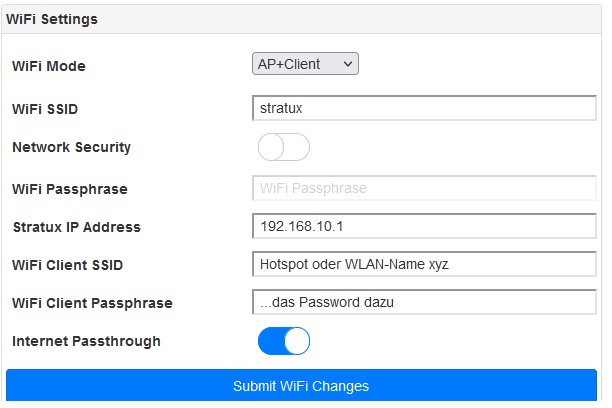
How does that work in flight?: → Via the Stratux AP+Client function. For this you have to create a hotspot on your mobile phone (with Internet) and register it in the config. This function is still not stable, but I find it works quite well.
..I once linked my Stratux documentation somewhere and described it there.
To install all that rubbish (MLAT packages, etc.), you have to tinker with a few console commands on the Stratux. For that you need to connect to the Stratux from Windows, for example using the tool -putty-. I don’t know your affinity for that.
and: …this quite interesting discussion has nothing to do with VFRnav.
→ except, as you write, that VFRnav only displays the registration on a TCP connection… Not on UDP? …Due to the weather, I unfortunately can’t verify it in flight.
but: …what’s important is that we’re happy to discuss it Thanks!
Exactly, I’m only concerned that the registration numbers are, for whatever reason, only displayed via TCP.
By the way, MLAT on the Stratux sounds interesting. I can manage to type a few commands into the terminal. Unfortunately, that’s all I can do. I’ll see where I can get that from now. But as I said: another topic.
This time just the connection to my Stratux without SafeSky. Result:
Connection via TCP: All OK. Non-position aircraft are shown with a blue circle, altitude and registration.
Connection via UDP: The circle is always orange, the altitude is shown and instead of the registration it says “MODE-S” there.
Young people would now say: “That’s crazy”
I don’t understand why it’s so different depending on the connection. A working connection via UDP would be desirable from my point of view. Do you know a solution?
These are simply different protocols that need to support different programs and their “peculiarities”.
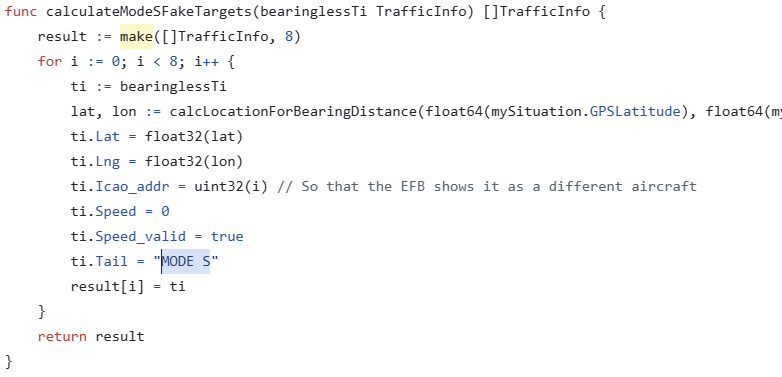
The protocol over UDP simply cannot carry MODE-S traffic by specification. To allow this to still be displayed in apps and EFISs, a bit of trickery was used.
Without wanting to go into the technical details: The designation “MODE-S” is as intended by Stratux.
My personal opinion on this: I couldn’t care less which identifier, which icon, which display in which colour. If Mode-S traffic is in the air and it is shown — in whatever form — look out even more closely than you already do!!
I would like to concur with Hermann once more at this point. Sometimes it’s not so easy to explain things. VFRnav receives data over a data connection (Wi‑Fi, Bluetooth, …) and via data protocols. With a Wi‑Fi connection this is typically TCP/IP or UDP. Which one is more suitable depends on the use case. Without going further into depth now: the advantage of UDP is that it is quasi …hmm… “connectionless” and therefore also faster (but more error-prone — which is perfectly acceptable!) … Errors do not refer to the MODE S data! — that refers to the transmission. For the VFRnav <> Stratux application, UDP is therefore more suitable, as it is considerably faster and entirely appropriate. …I must say it again: if you have a current Stratux with calibrated SDRs and well-positioned antennas, you are actually very well equipped.
Thanks for the explanation. I thought it was a bug in VFRnav’s analysis of the data.
Instead, the data are not offered any differently by the Stratux via UDP. So that’s a different matter.
Unfortunately so many people still fly without FLARM and without ADS-B. I find the plain circles for non-position targets far too poor for my situational awareness, especially since the data are available via SafeSky.
My larger aircraft have TCAS. I wouldn’t want to be without something like that.
…You can switch off the “circles” …bearingless Targets in the Stratux web interface! (please take a look at my Stratux documentation). Then they won’t bother you any more.