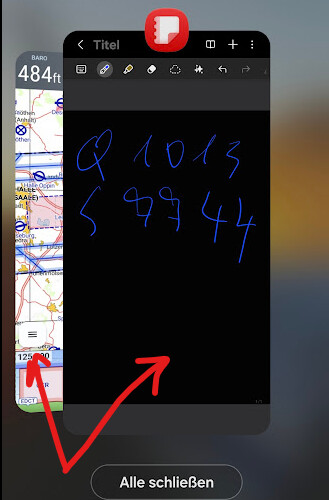
Translation:
“Are you planning to add notes to the application? Just a simple button that opens a blank page where you could write with your finger, for example QNH or instructions from the controller?”
Translation:
“Are you planning to add notes to the application? Just a simple button that opens a blank page where you could write with your finger, for example QNH or instructions from the controller?”
Hello Petr,
Thanks for the suggestion (idea). You don’t want to switch the screen? Otherwise one could, e.g., use Notes (Android).
For pilots using phones, a picture-in-picture solution will certainly not be practical, as it’s too small.
For suitable tablets it’s certainly a good solution.
@hermann
Happy flying,
Karsten
Hello,
To be honest I had a scratchpad built into my previous software and I never used it.
I often set frequencies and transponder codes in advance when I hear the controller’s conversations with other pilots. (I cheat a little… !)
I often fly in complicated areas. Radio exchanges go very fast, we don’t even have time to find the scratchpad button before it’s already too late.
If you’re the one calling the controller you can prepare, but if it’s the controller calling you then his message is finished before you’ve found the button 
And if he gives you a WS point and 5 other pieces of info your map is no longer on the screen, you no longer see the point, etc… something unexpected, it’s already over…
The paper-and-pencil solution is pretty good, unless you can’t remember where you put the pencil 
But as for adding it to the software, it’s always one more button, operations to compensate for another problem, and so on. And in the end you don’t access the button fast enough. Where is the button? All that for nothing… 
What’s also nice is that a function that doesn’t exist you don’t need to learn 
So, noting the codes in advance on the channel, (or on a piece of paper) is a very good trick and the controller is impressed when you repeat everything without any error and set all the frequencies in less than 5 seconds 

Hope this help.
Daniel.