Good evening,
at the moment I’m still flying with an old SkyEcho, but due
Hello C.P.
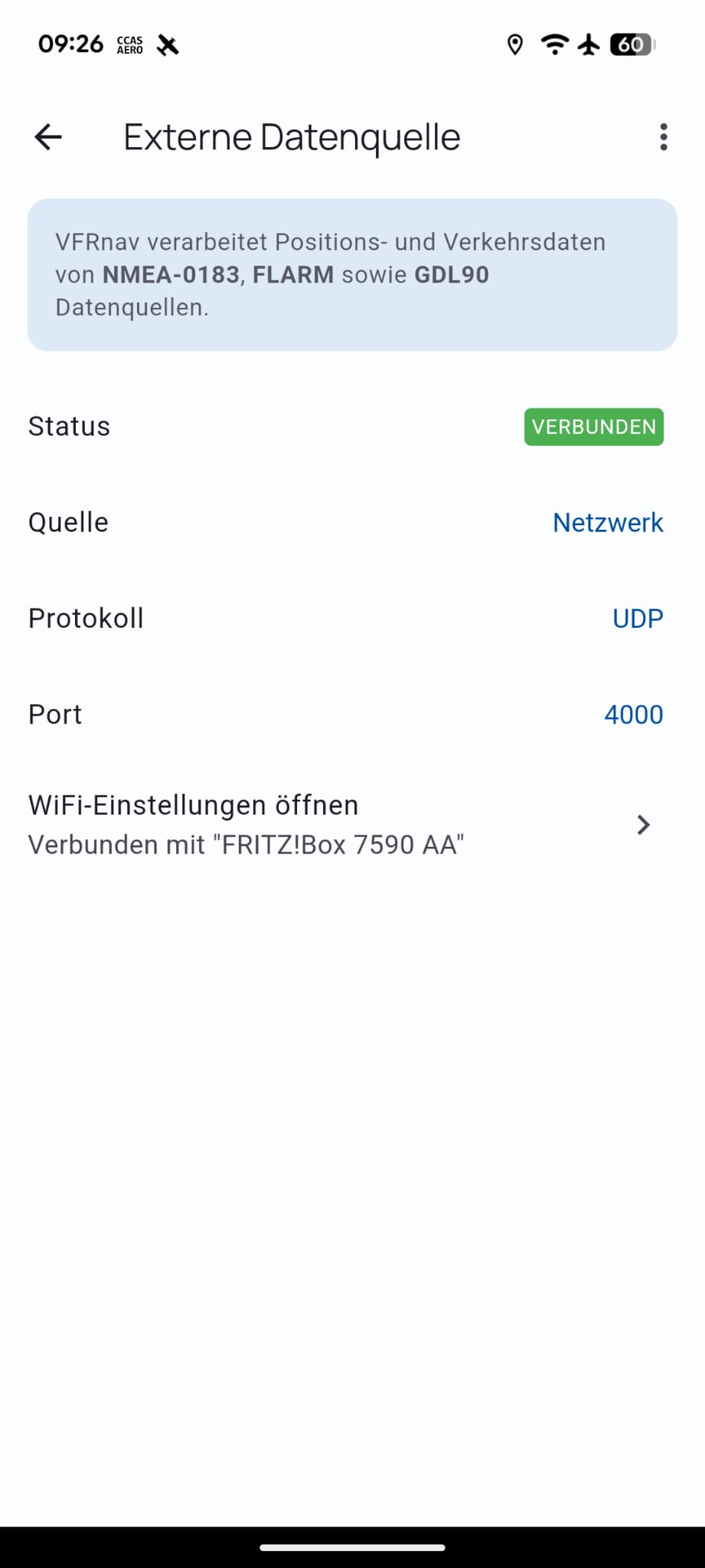
Apparently your VFRnav settings have the connection data to the SkyEcho stored via the TCP protocol.
Set the source to Netzwerk (Network), the protocol to UDP and the port to 4000.
You only need to launch the CCAS app and leave it running in the background. VFRnav will then connect automatically. That’s all there is to it.
Note:
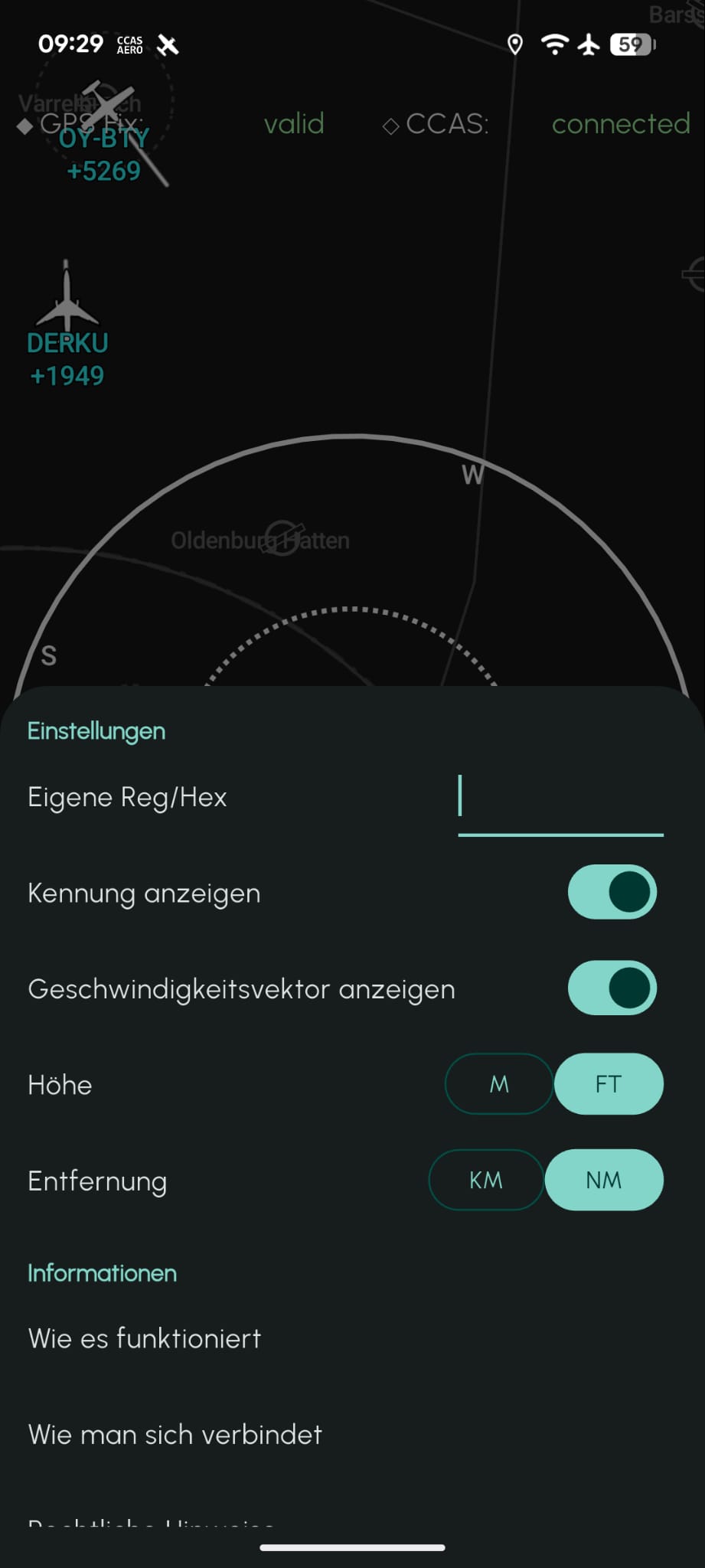
To avoid seeing “yourself” as traffic on the map, you can enter your own identifier in CCAS. Either the hex value of your transponder (or Flarm), or the callsign as shown on the map.
Let me know if this helps or if you have any further questions.
Best regards,
Hermann
1 Like
Hello ClearProp,
In addition to Hermann’s explanations, perhaps also:
→ Android or Apple? → Version?
→ Mobile phone?
Please check whether the app is really running in the background? …or do you have to confirm the explanation again when opening the task view (app switcher)? → then it isn’t running.
…and a brief update would always be appreciated.
Regards and simply fly,
Karsten
1 Like
Hello everyone,
please excuse the late reply. Thank you for the quick help and the valuable tip! It was indeed due to the settings in VFRnav. The network settings were incorrect. Sorry – I hadn’t realised that I had changed that.
In any case, everything is working very well together!!! Highly recommended
I got it working too!
Great app 
Downloaded ccas, opened it and it connected straight away
Hello everyone,
I’m reopening this topic.
My phone, an iPhone 12 Pro, was updated to the new iOS 26 yesterday.
During today’s session in Flieger I noticed that the CCAS integration is currently not working.
The app itself is running perfectly – I see two green dots and traffic around me. However, this currently isn’t being transmitted to the VFRnav app.
Are you experiencing similar issues? Or maybe you’ve already got a solution?
I’d really appreciate any help!
Hello @normando_RR,
yes – the bug is known and could be reproduced with the new iOS 26 update.
An update is already on its way and should arrive on devices tomorrow 
Flying regards
Hermann
The update has been installed! Traffic data are working perfectly again.
Thanks for the quick reply!
Have a great flying weekend, everyone 
Do I need an additional device besides the CCAS app to use this function?
Both apps work perfectly fine separately but together only over Wi-Fi, not in flight over LTE/5G.
Thank you in advance
@Mustang83
Which system (Apple/Android) are you using?
Apple iPhone with iOS 26.0
Please check whether the new CCAS update 25.09.2 has already reached your device. It was released yesterday and should resolve this issue on the new iOS 26.
Just installed and it’s working. Many thanks for the support.
No problem!
If you notice anything, feel free to write here again.
Hello, CCAS works great in flight at hiding its own Mode S address. Is it not possible to also hide the FLARM ID at the same time?
Thank you
Hi,
Multiple identifiers can be separated by a comma (“,”). This allows multiple identifiers/IDs.
Pilot’s regards
Hermann
Hello everyone, I’m trying
to connect CCAS with VFRnav, which
also works at home over the Wi‑Fi
connection. When I
but at the airfield, no avail-
able Wi‑Fi is present and it
doesn’t connect. What do I
need to configure?
I’m using a Samsung Z-Fold 5
Hello Achim,
With the default settings, starting CCAS and VFRnav is sufficient.
Have a look in the VFRnav settings under “External Data Source”.
The following must be set there:
- Source: Network
- Protocol: UDP
- Port: 4000
With those settings it runs flawlessly on all my devices.
Best regards,
Sven
Hello Sven,
many thanks for the quick reply. The settings are correct. At home it also connects and everything is displayed. It is then connected via my home Wi‑Fi. At the airfield it, of course, cannot find my home network and does not connect.
What am I doing wrong?
Kind regards from the Westerwald
Achim
Hello Achim,
CCAS and VFRnav are running on the same device, correct?
The connection is not via Wi‑Fi, so that shouldn’t have any effect.
Pilot’s regards
Hermann