Bluetooth adapter BT-1 not recognized

Hello,

I connected the BT-1 to my KRT2 following the guide Guide: Connecting VFRnav with a TQ KRT2 Radio. Unfortunately the adapter is not detected in VFRnav under “Radio”. No Bluetooth device is shown there.

The BT-1 works and is detected in the original iOS app (the one used to control solar modules).

How can I get this device running in VFRnav?

Thanks in advance for your help,

Achim

Hello Achim,

First of all, welcome here.

  1. I recommend you read my post

BTLE Adapter ATR833 - VFRnav ...so funktioniert's, even if you don’t have the adapter. You must under no circumstances try to establish a classic Bluetooth (BT) connection via the OS!

  1. I don’t know of any good experiences with the BT “box” — we couldn’t get it to run for a friend either! (not with VFRnav and not with any other program)
  2. Get Hermann’s adapter from the shop and be perfectly happy. https://shop.flugbetrieb.com/de/

Happy flying

Karsten

Hello Karsten,

thanks for the quick reply.

I read the post BTLE Adapter ATR833 - VFRnav …so funktioniert’s and followed the instructions — i.e., I didn’t establish a standard BT connection in iOS and waited to have the device discovered in VFRnav.

Unfortunately that didn’t work.

I then tried the original iOS app for the BT-1 to find out whether the module is okay. And lo and behold, the BT-1 module is detected immediately in that app. From a hardware point of view everything seems fine as well; all connections are as they should be.

So it seems to be a (software) problem with VFRnav, which surprises me, since the device itself along with the construction instructions was mentioned there as a possible BT connection. I therefore assume it should work, unless the software has been changed to support only its own modules, which I can’t imagine.

Regards
Achim

Hi Achim,

These are “guesses” I can offer, because 1. I use Android and 2. as I said, I couldn’t get it running some time ago on a buddy’s Apple device either. But that doesn’t help you!

  • Do you have other BT (Bluetooth) devices operating nearby? (With some Stratux units I had problems with the early series. Stratux and also a T‑Beam have BT on by default.) FLARM devices probably too. This can create a preferred connection without you noticing… but I don’t know your environment.
  • Which BT version is running on your phone/tablet?

On a brand‑new tablet (Bluetooth LE (BTLE) 6.x) I also had trouble under Android setting up a - test adapter - from the pre‑series.

Maybe I suspect this is the issue?

Unfortunately I can’t say more at the moment, which I’m sorry about.

Blue skies,

Karsten

Hello Karsten,

Thanks so much for the super quick reply. :grinning_face:

I’m using an iPad 6 with iOS and no other Bluetooth connections. I don’t have Stratux or anything similar, only the BT-1.

I don’t know the Bluetooth version. I need to check. I’ll also update the iPad once more. Maybe that will help.

The idea of the default connections sounds logical to me. Maybe there’s some Bluetooth device in the hangar? I’m going back to the airfield this evening and will test it.

I’ll report back afterwards; until then,

Thanks again for your prompt help and have a nice evening

Achim

Hi Karsten,

I’m currently on the plane and have checked everything again.

Result:

  1. The BT-1 is connected correctly.
  2. The BT-1 is detected by the iPad.
  3. The BT-1 is detected by the SNRE app (which was developed for the BT-1) and a connection is established.
  4. The BT-1 is NOT RECOGNIZED IN VFRnav!

Conclusion for me as an electronics technician: The error is in VFRnav, which simply does not want to recognize the BT-1, which strengthens my suspicion that the module is no longer supported by Hermann in favor of his own modules.

I bought the BT-1 based on Hermann’s own build manual and wired/set it up exactly according to the instructions, because it also seemed like the best solution for my C42.

It’s strange that the module works only in the app it was purchased for, and that there is no longer a manual from the app’s manufacturer for exactly that.

Do I have to assume that from now on only the Bluetooth adapters offered by Hermann work in VFRnav, or will other adapters (e.g. from SD-Link) also work?

And what am I supposed to do now with my apparently useless BT-1?

Best regards,

Achim

Hi Achim,

First of all, thanks for sharing your findings — and sorry it didn’t work right away. I think we can get it working together :slightly_smiling_face:.

I personally use the BT-1 solution in my Breezer, and it still works there. However, it’s possible that there have been changes to the BT-1 in the meantime that we need to account for in VFRnav first. So I’d appreciate your further help :grin:.

Please download the free app:

Universal BLE (App Store)

Then please proceed as follows:

  1. Tap the Play button in the top right to start scanning.
  2. Select the BT-1 from the device list.
  3. Tap Connect.
  4. Then select Discover Services.
  5. Press the Copy Services button.
  6. The data is now in the clipboard. Please post the contents here in the forum.

I hope the instructions are clear. If anything is unclear or you get stuck at any point, just ask :blush:.

Clear skies
Hermann

I’ve only just properly read/understood your last post. It’s a shame people often jump to conclusions. It sometimes seems that no matter what you do, it’s wrong.

I don’t take things like that personally anymore. For me it’s more of a societal issue: distrust, envy, and snap judgments unfortunately come up again and again — even among fellow pilots.

Maybe we should all try to assume good intentions and work together to get along.

The online world is fast-paced, and I can well imagine that projects like these can sometimes be frustrating. Still, I find the expectation to be presented with a solution within a few hours a bit odd. Especially since Karsten has already done very good groundwork and the issue was tackled constructively from the start.

1 Like

BT-1 works great here too. On the KRT2. Back then I received the instructions as an email from Hermann. Top service. I think the BT-1 came from Amazon. There’s absolutely nothing to complain about the solution and I can only shake my head at the thread starter’s ranting.

Gerhard

Achim, you’re confusing — to put it mildly — something here.

It’s a big gesture of Hermann’s to publish and document such “open-source solutions” at all. → does he have to do that? NO! Apart from work, he gets nothing out of it. You really can’t expect to be presented with the finished solution as well. - we, the great community here in the VFRnav Forum, are happy to help as much as we can. We do this also to give Hermann some breathing room so he can implement requests and ideas.

Yes, it would be something completely different if an adapter from the shop didn’t work.

I’ll speak with my buddy again when I get the chance about what difficulties there were back then…(I’ve forgotten)

In that spirit, here’s to good cooperation here; I sometimes find my words ambiguous too.

:slightly_smiling_face::+1:

Happy flying,

Karsten

Hello Hermann, Karsten, Gerhard …

You are all right, I certainly went too far. I would like to apologize for that. With a bit of distance I noticed it too, and I’m glad that you replied to me in the same way and the matter escalated.

This is no excuse, but yesterday I was simply annoyed that, after all the work on the plane, all attempts to get the BT-1 running failed. I just couldn’t explain it, because the thing was recognized by its own software. And when Karsten wrote that he’d already had problems with it, I probably drew the wrong conclusions. Sorry.

Hermann, your guide for Bluetooth via BT-1 was and is great — otherwise I certainly wouldn’t have started with it in the first place. And I’m grateful that it exists. Please don’t let comments like mine here put you off course. I’ve been very satisfied with the software for many years, especially because it comes from practical experience. And that “my” adapter doesn’t work can have many causes — I understand that.

When I’m back at the plane, I’ll try to try out your solution approach. Let’s see how far I get. I’ll report back and promise to do better.

I’d be happy if you could help me get the BT-1 up and running after all.

Until then,

many greetings and thanks for your help

Achim

Hello Achim,

Great clarification — and thanks for the “courage” to do that. We’re all human… and when you’re a bit overloaded you don’t always find the right words — especially when you can only put it in writing. So you’re welcome here :slightly_smiling_face:.

Happy flying,

Karsten

2 Likes

…so: I just talked this over with my buddy. This BT-1 adapter didn’t work with SkyMap. It’s supposed to actually work with VFRnav. Well, unfortunately I have no experience with that. Maybe you could check the connections, etc. again.

I know that doesn’t help now.

Blue skies, Karsten

Hi everyone,
I’m currently assuming that there is another (newer?) version of the BT-1 in which the hardware Bluetooth stack was changed. Therefore the information mentioned above would be important for the implementation in VFRnav :+1:

Many flying greetings and have a nice Sunday
Hermann

Hello everyone,

I’m sitting on the plane right now and got the following data with the Universal BLE app:

Connection: Disconnected

Connection: Connected

ConnectionResult: Connected

DiscoverServices: 4 services discovered

Service: 0000180a-0000-1000-8000-00805f9b34fb

00002a50-0000-1000-8000-00805f9b34fb (read)

00002a26-0000-1000-8000-00805f9b34fb (read)

Service: 00010203-0405-0607-0809-0a0b0c0d1912

00010203-0405-0607-0809-0a0b0c0d2b12 (read, writeWithoutResponse)

Service: 0000ffd0-0000-1000-8000-00805f9b34fb

0000ffd1-0000-1000-8000-00805f9b34fb (writeWithoutResponse, write)

Service: 0000fff0-0000-1000-8000-00805f9b34fb

0000fff1-0000-1000-8000-00805f9b34fb (read, notify)

DiscoverServices: 4 services discovered

Service: 0000180a-0000-1000-8000-00805f9b34fb

00002a50-0000-1000-8000-00805f9b34fb (read)

00002a26-0000-1000-8000-00805f9b34fb (read)

Service: 00010203-0405-0607-0809-0a0b0c0d1912

00010203-0405-0607-0809-0a0b0c0d2b12 (read, writeWithoutResponse)

Service: 0000ffd0-0000-1000-8000-00805f9b34fb

0000ffd1-0000-1000-8000-00805f9b34fb (writeWithoutResponse, write)

Service: 0000fff0-0000-1000-8000-00805f9b34fb

0000fff1-0000-1000-8000-00805f9b34fb (read, notify)

DiscoverServices: 4 services discovered

Service: 0000180a-0000-1000-8000-00805f9b34fb

00002a50-0000-1000-8000-00805f9b34fb (read)

00002a26-0000-1000-8000-00805f9b34fb (read)

Service: 00010203-0405-0607-0809-0a0b0c0d1912

00010203-0405-0607-0809-0a0b0c0d2b12 (read, writeWithoutResponse)

Service: 0000ffd0-0000-1000-8000-00805f9b34fb

0000ffd1-0000-1000-8000-00805f9b34fb (writeWithoutResponse, write)

Service: 0000fff0-0000-1000-8000-00805f9b34fb

0000fff1-0000-1000-8000-00805f9b34fb (read, notify)

The BT-1 looks externally exactly like in Hermann’s manual. The cable colors are the same as well. But you can’t tell what’s actually inside because the enclosure is potted (encapsulated).

Do you need any more information?

Best regards

Achim

Hi Achim,

I’m really puzzled right now. At first glance this looks correct and should be identical to my BT-1 :thinking: I’ll check that more closely next week, but for now everything looks good.
A few more questions:

  • If you tap “Interface” under “Device Connections” and wait there, or press “Refresh list”, nothing shows up there already, correct?

  • What does VFRnav say in Settings under “About VFRnav”?
    The version should be >4.26.x here — can you confirm?

  • At the airfield, is VFRnav (e.g. external data source) or iOS itself connected to any other Bluetooth device (e.g. a headset or similar)?

  • In the iOS Settings under “Bluetooth” the switch is enabled, correct?

  • In the iOS Settings under “Apps” > “VFRnav” — “Bluetooth” is enabled there, correct?

  • Which iOS version is installed?

It would be great if you could confirm/check these points.

Blue skies
Hermann

Hello Hermann,

Thanks so much for taking care of my problem even on a Sunday.

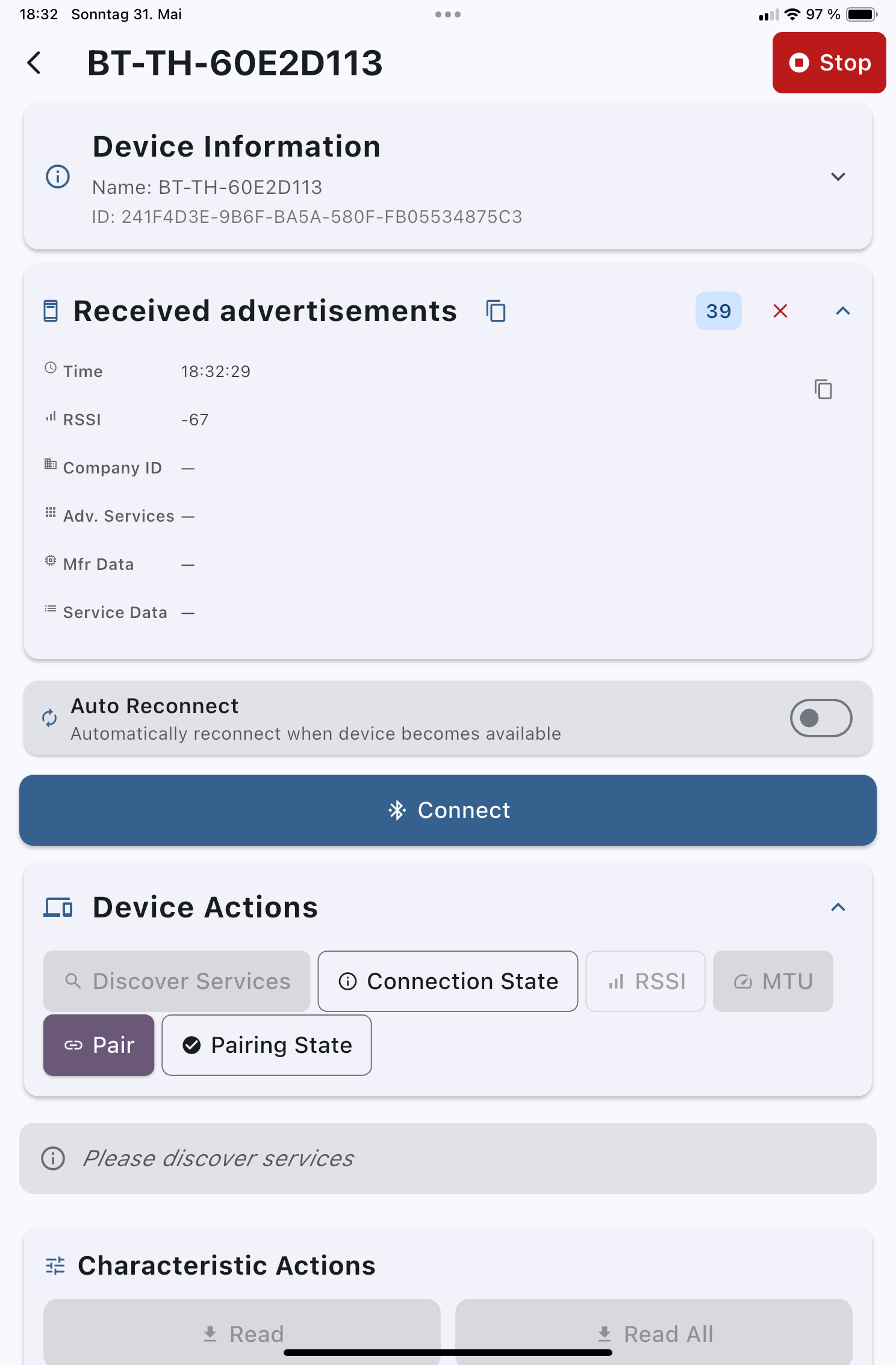
I’m back home now and only just noticed that I apparently forgot the most important thing: the device ID of my BT-1 — silly me. Fortunately I did bring the BT-1 and briefly powered it up again here. Here’s the screenshot:

I’m glad everything looks OK so far. Regarding your questions:

  1. Correct, I don’t see any interfaces in VFRnav.
  2. Correct, VFRnav 4.26.2 is installed on my iPad.
  3. The iPad wasn’t connected to any other Bluetooth device during testing.
  4. Correct. Bluetooth is turned on in iOS on the iPad.
  5. Bluetooth is also enabled for the VFRnav app.
  6. I’m using an iPad 6 with iPadOS 18.7.8 (22H352)

Best regards from the :skull_and_crossbones:end of the world (huge thunderstorm/hail) and have a nice Sunday

Achim